[ad_1]
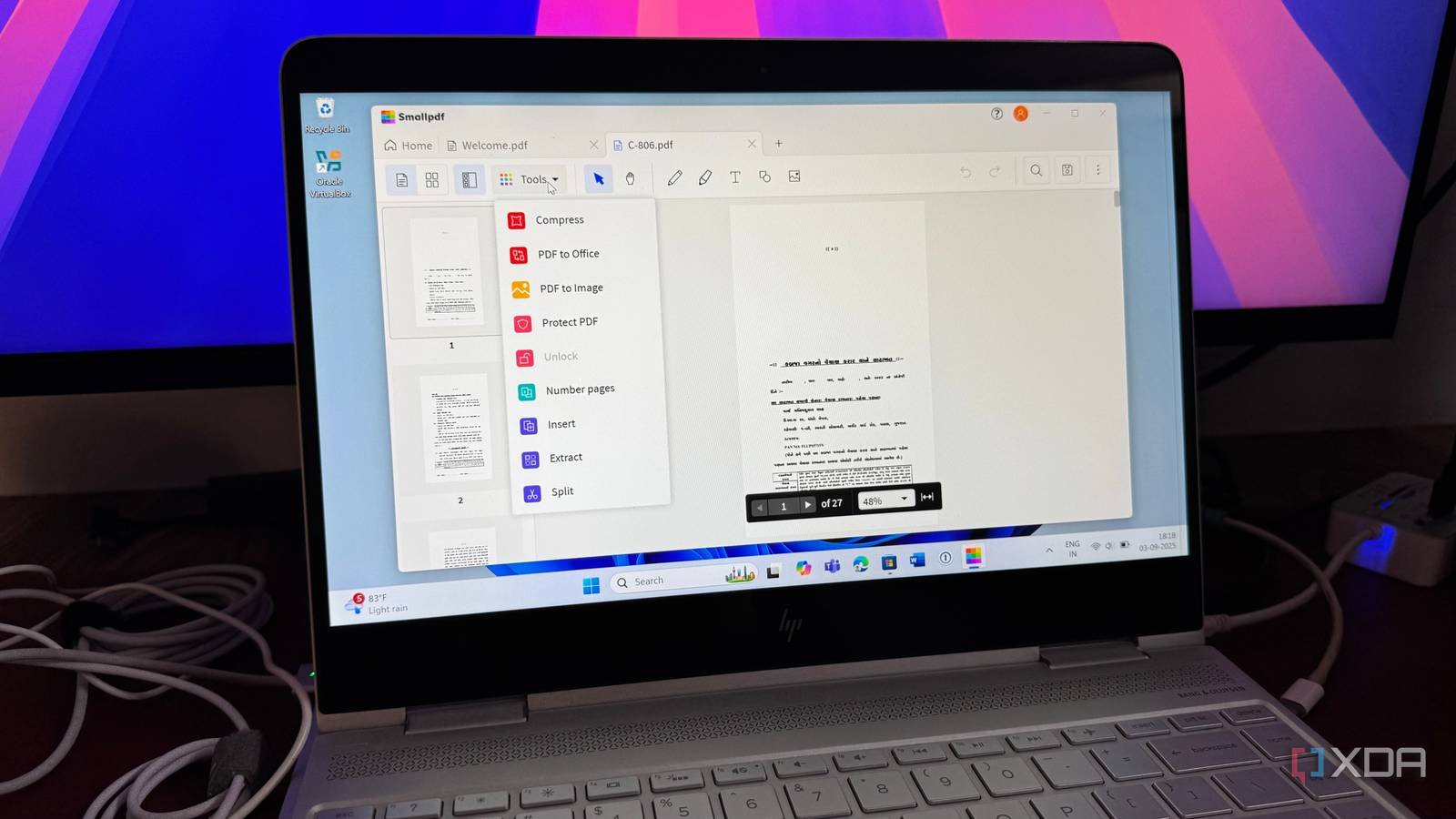
While there is no shortage of Adobe Acrobat alternatives out there, I kept coming back to the popular solution for obvious reasons. After trying out several rivals, I stumbled upon Smallpdf, and it immediately ticked all the boxes for me. From its user-friendly interface to a comprehensive suite of tools, Smallpdf offers everything you need in a clean, affordable package.
Smallpdf’s intuitive drag-and-drop design and clear tool icons have already saved me countless hours, and it proves that a powerful PDF solution doesn’t have to be complicated or come with a hefty price tag.
Cross-platform availability
With a handy web version

What truly sets Smallpdf apart from other web-based PDF solutions is its versatility across platforms. Unlike many rivals who are web-only, I can access Smallpdf’s suite of tools in multiple, convenient ways that fit my workflow.
I find the web version to be the most accessible, as I can use it on any computer, anywhere, without needing to install anything. It’s perfect for quick tasks like converting a document or compressing a large file before emailing it. The interface is clean and intuitive, so I never waste time searching for the right tool.
Smallpdf edges out online-only competitors with its native Windows app. This app lets me work with my PDFs offline, which is a huge benefit when I’m traveling or dealing with an unreliable internet connection. I can continue to edit, merge, or organize documents without worrying about a connection.
Smallpdf’s mobile apps for iOS and Android are an absolute must-have for me. They have a powerful document scanner feature that uses my phone’s camera to turn physical documents into high-quality PDFs. The mobile apps also allow me to perform quick edits and E-Sign documents directly from my phone.
Even the watermark feature is quite useful, where I can change the font type, size, color, and even play with opacity to make the fonts more readable.
Packed with useful features
You won’t miss Adobe Acrobat

Smallpdf is a powerhouse of features that I have found useful for everything from quick edits to major projects. Here are some of the standout features that have convinced me to switch.
Smallpdf’s editor lets me add text, shapes, and images directly to a document. I also love the freehand drawing tool, which is perfect for adding quick notes or highlighting specific sections in a more personalized way.
The conversation tool is the feature I use most. I can convert PDFs to and from a wide range of formats like Word, Excel, and PowerPoint with just a few clicks, and the formatting stays intact.
Aside from simple edits, I can password-protect any PDF and ensure my sensitive documents are safe before I send them. But what’s more impressive is the e-signature tool. It’s powered by sign.com, where I can quickly create a legally binding electronic signature, add it to a document, and fly through my contracts and agreements.
OCR is another handy feature. It is smart enough to recognize the text in my scanned PDFs and convert it into a searchable and editable file.
And when I need to share a document but want to protect private information, the redact feature comes into play. Instead of just covering up text with a black box, this tool securely removes selected content from the document. It’s a must-have feature for protecting confidential data like financial details before sharing.
Handy AI add-ons
Chat with your PDF
Adobe Acrobat recently introduced a NotebookLM-style chat feature, where you can ask specific questions and receive answers directly from the uploaded files. I was surprised to find the same feature in Smallpdf.
I can chat with PDF, use the AI PDF summarizer, and even translate PDF. It is quite handy for tackling dense documents like research papers or long reports. I simply upload a file, and Smallpdf instantly generates a concise summary of the key points.
But it doesn’t stop there. I can then use the AI chatbot to ask specific questions about the document, like What services does JMFSL provide to its clients? What are the obligations of the Research Analyst according to the RA Regulations, and more.
Smallpdf displays relevant answers and even the source so that I can always refer to the text from the uploaded document.
It’s like having a conversation with my PDF, which helps me quickly find information without having to scroll endlessly. I uploaded a 10-page document on Smallpdf and started asking complex questions, and it passed the test with flying colors.
Speaking of the pricing, the free plan offers 30+ tools and up to two signatures per month. However, if you are a power user and want all the bells and whistles, be prepared to upgrade to the paid plan at $15 per month (or $9 when paid annually).
Fly through your PDF edits
Overall, Smallpdf is more than just a PDF viewer; it’s a lightweight, all-in-one suite of tools that has changed how I manage documents. For anyone tired of dealing with slow load times, complex menus, and high subscription fees, Smallpdf offers a refreshing, streamlined, and highly effective alternative.
While Smallpdf scores high on many areas, it’s not a self-hosted solution. If you are looking for a truly private PDF tool, check out Stirling PDF.
[ad_2]
Source link